


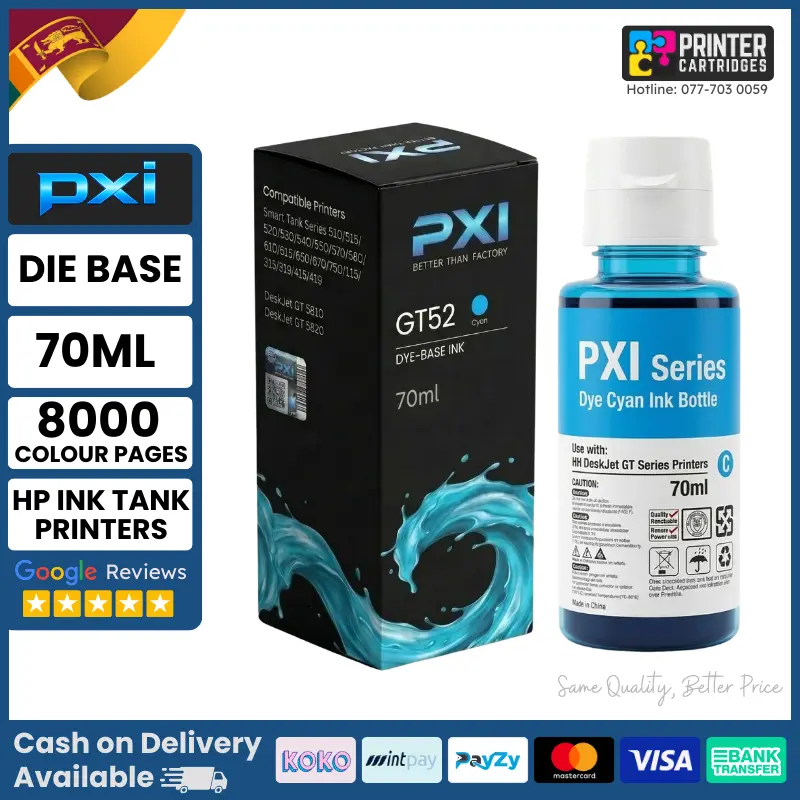









PXI GT52 Cyan Ink Bottle for HP GT52 Ink Tank Printers
PXI GT52 Cyan Ink Bottle is a premium qualified ink designed as a smart alternative to the original HP GT52 Cyan ink. Engineered to deliver the same vivid colors, sharp prints, and smudge-free results you expect from original inks at a significantly lower cost. Available exclusively at PrinterCartridges.lk with island-wide delivery, Cash on Delivery, and flexible payment options (Koko, MintPay, Payzy, and up to 60-month installments). Call or WhatsApp us on 0777030059 / 0770868779 for orders and support.
Why Choose PXI GT52 Cyan Ink?
✅ Same quality as original HP GT52 Cyan ink at a smarter price
✅ Dye-based ink for vivid, lifelike colors and photo-quality prints
✅ Spill-free nozzle design for clean and easy refilling
✅ Printhead-safe formula prevents clogging and protects your printer
✅ Ideal for home, office, school, and business use in Sri Lanka
✅ 1.5 years warranty (once opened, use within 6 months for best results)
PXI GT52 Cyan Ink Bottle Specifications
- Ink Type: Dye Cyan
- Volume: 70ml
- Page Yield: Up to 8000 pages (A4, 5% coverage)
- Compatible With: HP GT52 Ink Tank Printers
- Brand: PXI Series by PrinterCartridges.lk
- Warranty: 1.5 Years (Use within 6 months after opening)
PXI GT52 Ink Bottle Support Printers
HP Smart Tank Series: 210, 500, 508, 510, 515, 518, 519, 530, 531, 538, 550, 570, 580, 610, 615, 650, 670, 750 HP Ink Tank Series: 115, 310, 315, 318, 319, 410, 415, 418, 419 HP DeskJet GT Series: GT 5810, GT 5811, GT 5820, GT 5821
How to Use PXI GT52 Cyan Ink Bottle
- Shake the bottle gently before use
- Open the cyan ink tank on your HP printer
- Insert the nozzle tip firmly into the tank inlet
- Squeeze gently and fill to the maximum line
- Close the tank cap securely
- Run a printhead cleaning cycle if needed
Why Buy PXI Ink from PrinterCartridges.lk?
✅ Lowest price in Sri Lanka with 1.5 year warranty
✅ Same vivid quality as original HP GT52 Cyan ink
✅ Flexible payments (Koko, MintPay, Payzy and up to 60 months)
✅ Island-wide delivery and Cash on Delivery available
✅ Printhead-safe and clog-free formula
✅ Trusted by thousands of customers across Sri Lanka
📞 Call/WhatsApp: 0777030059 / 0770868779 for orders and support
👉 PXI GT52 Cyan Ink Bottle is the smartest choice for HP Ink Tank and Smart Tank printer users in Sri Lanka looking for vivid color prints at a lower cost.
Is PXI GT52 compatible with my HP Smart Tank printer?Yes! PXI GT52 Cyan Ink Bottle is fully qualified for all HP Smart Tank Series (210, 500, 508, 510, 515, 518, 519, 530, 531, 538, 550, 570, 580, 610, 615, 650, 670, 750), HP Ink Tank Series (115, 310, 315, 318, 319, 410, 415, 418, 419) and HP DeskJet GT Series (GT 5810, GT 5811, GT 5820, GT 5821) printers.How many pages does PXI GT52 Cyan Ink print?PXI GT52 Die-Base Ink Bottle delivers up to 8000 pages per bottle on A4 paper at 5% ink coverage.Is PXI GT52 ink safe for my HP printer's printhead?Yes! PXI GT52 is formulated with a printhead-safe formula that prevents clogging and protects your HP printer's thermal printhead for long-term reliability.Will using PXI GT52 ink void my HP printer warranty?No. Using third-party qualified ink does not automatically void your printer warranty under Sri Lanka consumer protection laws.How long can I store PXI GT52 ink after purchase?PXI GT52 Cyan Ink Bottle has a 1.5 year warranty. Once opened, use within 6 months for best print quality and results.Does PXI GT52 produce the same quality as original HP GT52 ink?Yes! PXI GT52 is engineered to deliver the same sharp text, deep blacks and smudge-free prints as original HP GT52 ink at a significantly lower cost.Is Cash on Delivery available for PXI GT52 ink in Sri Lanka?Yes! PrinterCartridges.lk offers Cash on Delivery island-wide for all PXI ink products. We also offer flexible payment options including Koko, MintPay, Payzy and up to 60-month installments.How do I refill my HP printer with PXI GT52 ink?Shake the bottle gently, open the Cyan ink tank on your printer, insert the nozzle tip firmly, squeeze gently to fill to the maximum line, close the cap securely and run a printhead cleaning cycle if needed.
Reviews
Clear filtersThere are no reviews yet.